

Best laptop for video editing in India 2026 — that is the
Apple MacBook Pro 16-inch (M4), priced between ₹3,40,000
and ₹4,10,000. For Windows users, the ASUS ProArt P16
(₹3,50,000–₹3,70,000) is the top choice. On a budget
under ₹1.5 lakh, the ASUS TUF Gaming F16 delivers reliable
4K editing performance.

Table of Contents
✅ How to Choose the Best Laptop for Video Editing in India 2026
Choosing the best laptop for video editing in India 2026
comes down to five key specs — RAM, GPU, display accuracy,
storage speed, and battery life.
Before the list — here is what separates a good video editing laptop from a frustrating one:
- RAM: 32GB minimum for smooth 4K. 64GB if you do multicam, 8K, or heavy After Effects work
- GPU: NVIDIA RTX 4060 minimum for GPU-accelerated DaVinci Resolve. RTX 4080/5080 for serious colour grading
- Display: Look for DCI-P3 coverage above 90% if you’re colour grading for clients
- Storage: 1TB NVMe SSD minimum. Keep a 2TB external SSD for project files
- CPU: Apple M3/M4 with media engine OR Intel Core Ultra/AMD Ryzen 9 for Windows
1. Apple MacBook Pro 16-inch (M3 Max / M4) — Best Overall
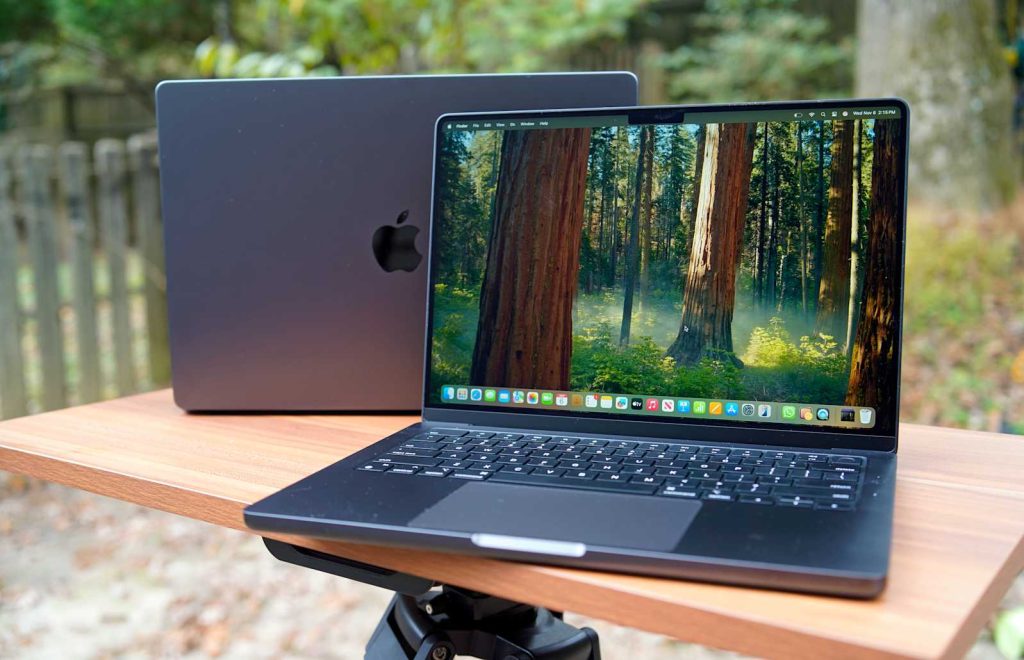
The Apple MacBook Pro 16-inch (M4) is the best overall laptop for video
editing in India in 2026, available between ₹3,40,000–₹4,10,000. Its
dedicated media engine exports a 10-minute 4K H.265 timeline in under
4 minutes, and the battery lasts up to 22 hours — the strongest
combination of performance and portability available.
The M4 chip’s dedicated media engine handles ProRes, H.264 and H.265 natively. Your timeline doesn’t stutter even on complex 4K multi-layer projects. Battery lasts a genuine 20–22 hours — you can shoot on location all day and edit through the evening without a charger.
Who Should Buy This?
- You edit in Final Cut Pro (macOS exclusive — no Windows alternative)
- You use Premiere Pro and want the smoothest possible 4K playback
- You travel between shoots and need all-day battery
- Your budget is ₹3.5 lakh and above
- You want a machine that lasts 5–6 years without feeling slow
Who Should Skip This?
- You rely heavily on CUDA-specific GPU plugins in DaVinci Resolve
- Your team or clients use Windows-only software
- You need upgradeable RAM or SSD down the line — MacBook is fully sealed
- Budget is under ₹2.5 lakh — better value exists at that range
2. ASUS ProArt P16 — Best Windows Laptop for Video Editing
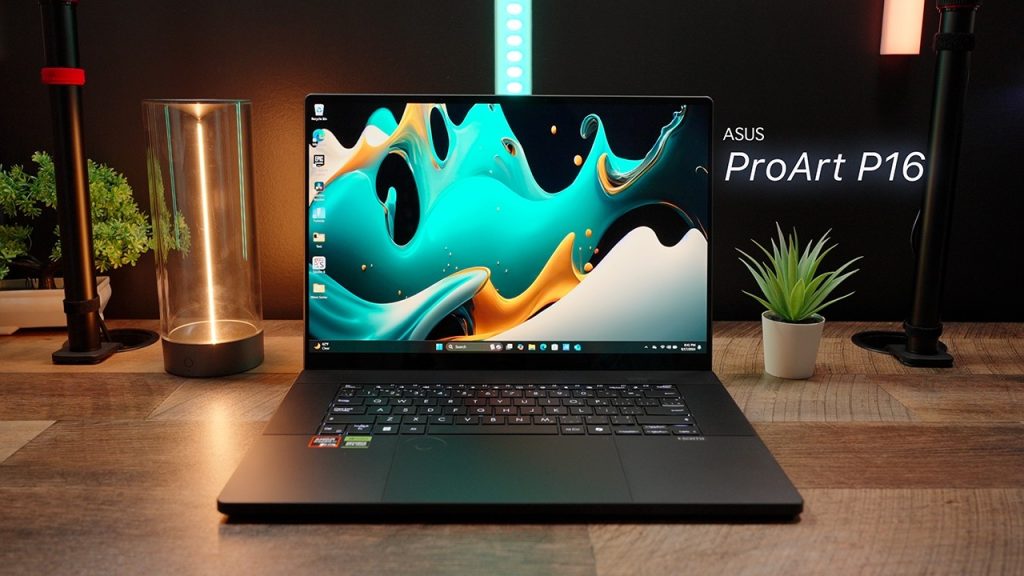
The ASUS ProArt P16 is the best Windows laptop for video editing in India
in 2026, priced between ₹3,50,000–₹3,70,000. Its 4K OLED display covers
99% DCI-P3 colour space, and the RTX 4070/50-series GPU handles
GPU-accelerated DaVinci Resolve effects without frame drops — making it
the top Windows choice for professional colour graders.
The ProArt P16 is built purely for creators. The 4K OLED display at 120Hz, 1,600 nits HDR peak, and 99% DCI-P3 coverage means your colour grade on this screen matches what your client sees on a calibrated monitor. RTX 4070 / 50-series GPU drives GPU-accelerated Resolve effects without lag.
Who Should Buy This?
- You do professional colour grading for clients and need display accuracy
- You use DaVinci Resolve with heavy GPU effects and noise reduction
- You attend client meetings — this doesn’t look like a gaming laptop
- You want a MacBook-level display on Windows
Who Should Skip This?
- You are a Final Cut Pro user — no point, it won’t run on Windows
- Budget under ₹2.5 lakh — the ROG Strix SCAR gives more raw power for less money
- You need a machine primarily for gaming alongside editing
3. Apple MacBook Pro 14-inch (M4) — Best Portable Option
The Apple MacBook Pro 14-inch (M4) is the best portable laptop for video
editing in India in 2026, starting at ₹2,10,000. It carries the same M4
chip and media engine as the 16-inch model at a lower price — ideal for
editors who travel between shoots and work connected to an external monitor.
Same M4 chip and media engine as the 16-inch. The only real difference is screen size and slightly reduced peak brightness. If you mostly edit at a desk connected to an external monitor, the 14-inch is the smarter buy — same performance, ₹1 lakh less.
Who Should Buy This?
- You travel frequently — Hyderabad to Mumbai, city to city, shoot to shoot
- You edit primarily connected to an external monitor
- You want MacBook Pro performance without MacBook Pro 16-inch prices
- You’re a freelance video editor who works from cafes and co-working spaces
Who Should Skip This?
- You edit exclusively on the laptop screen without an external monitor — the 14-inch display feels cramped for complex timelines
- You do 8K or heavy multicam editing — go for the 16-inch M3 Max configuration instead
4. ASUS ROG Strix SCAR 16 — Best Performance per Rupee on Windows
The ASUS ROG Strix SCAR 16 is the best performance-per-rupee Windows
laptop for video editing in India in 2026, priced between
₹2,79,990–₹3,20,000. The RTX 4080 GPU delivers top-tier DaVinci Resolve
colour grading performance and real-time 4K playback — at significantly
less cost than the MacBook Pro or ProArt P16.
RTX 4080 GPU, Intel Core i9 or AMD Ryzen 9, 32GB RAM, mini-LED 240Hz QHD+ display. In DaVinci Resolve GPU benchmarks, the RTX 4080 consistently scores in the top tier for colour grading responsiveness, noise reduction, and real-time playback of 4K footage with applied grades.
Who Should Buy This?
- You use DaVinci Resolve as your primary NLE and want maximum GPU performance
- You want RTX 4080 performance without paying MacBook Pro prices
- You edit from a home studio or fixed desk setup
- You also game — this machine handles both without compromise
Who Should Skip This?
- You attend client meetings frequently — the RGB and aggressive design isn’t for everyone
- You prioritise battery life — expect 4–5 hours maximum under real editing load
- You need a colour-accurate display out of the box for professional grading — the ProArt P16 wins that comparison
5. Dell XPS 16 — Best Professional-Looking Windows Laptop
The Dell XPS 16 is the best professional-looking Windows laptop for video
editing in India in 2026, priced between ₹2,50,000–₹3,50,000. It combines
RTX 40-series GPU performance with a premium aluminium build and OLED
display option — the right choice for editors who work directly with clients.
RTX 40-series GPU, OLED display option, premium aluminium build. The XPS 16 is the laptop you open in front of a client and they don’t question your daily rate. Performance handles multi-track 4K reliably.
Who Should Buy This?
- You work on-site with clients and need a professional appearance
- You use Premiere Pro or DaVinci Resolve for corporate video and branded content
- You want premium build quality with a Windows OS
- Budget is ₹2.5 lakh–₹3.5 lakh
Who Should Skip This?
- Raw GPU performance matters most — the ROG Strix SCAR beats it at the same price
- You edit 8K or very heavy VFX timelines — this isn’t a workstation-class machine
6. Lenovo Legion Pro 7i Gen 10 — Best Hybrid (Editing + Gaming)
The Lenovo Legion Pro 7i Gen 10 is the best hybrid laptop for video editing
and gaming in India in 2026, priced between ₹1,90,000–₹2,30,000. The RTX
4070/4080 GPU handles 4K DaVinci Resolve and Premiere Pro timelines
reliably — making it the strongest all-rounder under ₹2.5 lakh.
Intel Core Ultra CPU, RTX 4070 or 4080, 240Hz display. Strong GPU acceleration for Resolve, solid Premiere Pro performance. The sweet spot for creators who edit videos Monday to Friday and game on weekends.
Who Should Buy This?
- You want a single machine for both editing and gaming
- Budget is ₹2 lakh and you want the best performance at that range
- You use DaVinci Resolve or Premiere Pro for YouTube or social media content
Important Note on Thermals
The Legion Pro 7i runs hot and loud under sustained load. Always use it on a hard flat surface. Consider a ₹1,500–₹2,000 laptop cooling pad for long export sessions. Fan noise during exports is significant — not suitable for recording voiceovers on the same machine simultaneously.
7. Razer Blade 18 Studio Edition — Best Desktop Replacement
The Razer Blade 18 Studio Edition is the best desktop-replacement laptop
for video editing in India in 2026, priced from ₹3,80,000 upwards. With
RTX 5080/5090 GPU options and an 18-inch display, it handles 8K footage,
heavy VFX, and complex motion graphics without any performance ceiling.
RTX 5080 or 5090, 18-inch display, full desktop-class GPU performance in a laptop body. For editors doing 8K, heavy motion graphics, or complex VFX compositing — this machine removes every bottleneck.
Who Should Buy This?
- Your edit suite is fixed in one location — studio, home office, agency workspace
- You edit 8K footage, multi-camera raw files, or heavy motion graphics
- You need maximum GPU VRAM for AI-accelerated effects in Resolve or After Effects
- You’ve outgrown your desktop workstation and want one powerful machine
Who Should Skip This?
- You carry your laptop to client sites or shoots daily — this is heavy and bulky
- Budget is the primary concern — better value at ₹2–3 lakh range with other options on this list
- You don’t need RTX 5080-level power for standard 4K YouTube content
8. HP ZBook Fury 16 G11 — Best for Agency & Corporate Video Teams
The HP ZBook Fury 16 G11 is the best workstation laptop for agency and
corporate video teams in India in 2026, priced between ₹2,50,000–₹3,50,000.
Its ISV-certified NVIDIA RTX Ada GPU guarantees maximum software stability
for broadcast NLEs — including Avid Media Composer and certified
colour science tools.
ISV-certified NVIDIA RTX Ada professional GPU. Built for broadcast environments and professional NLEs where stability and certified driver compatibility matter more than raw benchmark scores.
Who Should Buy This?
- Your agency uses Avid Media Composer or ISV-certified broadcast software
- You deliver video for television, OTT platforms, or broadcast clients with strict technical specs
- Your team cannot afford a crash mid-project on a client deadline
- You need enterprise-grade build quality and HP’s on-site warranty support across India
Who Should Skip This?
- You’re a solo YouTube creator or freelancer — this is overkill for your workflow
- Budget under ₹2 lakh — far better performance-per-rupee options exist on this list
- You use consumer NLEs like Final Cut Pro or standard Premiere Pro — you won’t benefit from ISV certification
9. Lenovo ThinkPad P1 Gen 7 — Best for On-Location Professionals
The Lenovo ThinkPad P1 Gen 7 is the best laptop for on-location video
professionals in India in 2026, priced between ₹2,00,000–₹2,80,000.
Its X-Rite Pantone-calibrated 4K OLED display delivers colour-accurate
results on location — combined with a slim, professional build that works
in client environments.
Slim professional workstation. 4K OLED X-Rite Pantone-calibrated display. NVIDIA RTX Ada professional GPU. The keyboard is the best on any laptop — relevant if you’re logging footage and editing long-form content for hours daily.
Who Should Buy This?
- You travel to client locations, shoots, and events constantly across cities
- You need display colour accuracy that matches a calibrated external monitor
- You edit long-form documentary, corporate film, or educational content
- You want a business laptop look with workstation internals
Who Should Skip This?
- You need maximum raw GPU performance — the ROG Strix SCAR beats it in benchmarks
- Gaming alongside editing matters to you — this isn’t built for that
- You want the most aggressive price-to-performance — this is a premium slim workstation
10. ASUS TUF Gaming F16 — Best Budget Laptop for Video Editing in India
The ASUS TUF Gaming F16 is the best budget laptop for video editing in
India in 2026, priced between ₹1,10,000–₹1,70,000. The RTX 4060 GPU
and 32GB RAM handle 4K timelines in Premiere Pro and DaVinci Resolve
reliably — making it the most honest value pick for student editors
and beginner creators.
RTX 4060, 32GB RAM, fast NVMe SSD. Handles 4K timelines in Premiere Pro and DaVinci Resolve. This is the most honest recommendation for Indian creators starting out — it gets real work done without financial stress.
Who Should Buy This?
- You’re a student or beginner creator building your editing skills
- You create YouTube videos, Reels, or social content — not high-end client deliverables
- Budget is firmly under ₹1.5 lakh
- You want to learn DaVinci Resolve or Premiere Pro on a machine that keeps up
Important Limitation to Know
The display colour accuracy isn’t suitable for professional colour grading for paying clients. If you grow into client work, pair this with an affordable colour-accurate external monitor like the BenQ PD2706U or LG 27UK850 — both available in India for ₹35,000–₹55,000. That combination still costs less than a MacBook Pro and delivers professional results.
Top 10 Video Editing Laptops India 2026 — Full Comparison
| # | Laptop | Best For | CPU | GPU | RAM | Storage | Display | Battery | India Price | Buy |
|---|---|---|---|---|---|---|---|---|---|---|
| 1 | Apple MacBook Pro 16 (M4) | Best Overall | Apple M4 / M3 Max | Apple Silicon + Media Engine | 36GB–128GB | 512GB–8TB SSD | 16.2″ mini-LED Liquid Retina XDR | 22 hrs | ₹3,40,000–₹4,10,000 | Amazon India |
| 2 | ASUS ProArt P16 | Best Windows | AMD Ryzen AI 9 | RTX 4070 / 50-series | 32GB–64GB | 1TB–2TB SSD | 16″ 4K OLED 120Hz 99% DCI-P3 | 10 hrs | ₹3,50,000–₹3,70,000 | Amazon India |
| 3 | MacBook Pro 14 (M4) | Best Portable | Apple M4 | Apple Silicon + Media Engine | 24GB–64GB | 512GB–4TB SSD | 14.2″ Liquid Retina XDR | 20 hrs | ~₹2,10,000 | Flipkart |
| 4 | ASUS ROG Strix SCAR 16 | Best Perf/Price | Intel i9 / Ryzen 9 | RTX 4080 | 32GB–64GB | 1TB–2TB SSD | 16″ QHD+ 240Hz mini-LED | 5 hrs | ₹2,79,990–₹3,20,000 | Amazon India |
| 5 | Dell XPS 16 | Professional Look | Intel Core Ultra 9 | RTX 4070 | 32GB–64GB | 1TB–2TB SSD | 16.3″ OLED 4K | 8 hrs | ₹2,50,000–₹3,50,000 | Dell India |
| 6 | Lenovo Legion Pro 7i | Edit + Gaming | Intel Core Ultra 9 | RTX 4070/4080 | 32GB–64GB | 1TB SSD | 16″ QHD+ 240Hz IPS | 4–5 hrs | ₹1,90,000–₹2,30,000 | Flipkart |
| 7 | Razer Blade 18 Studio | Desktop Replacement | Intel Core i9 | RTX 5080 / 5090 | 32GB–64GB | 2TB SSD | 18″ QHD+ 240Hz / 4K OLED | 4 hrs | ₹3,80,000–₹4,50,000+ | Import |
| 8 | HP ZBook Fury 16 G11 | Agency / Broadcast | Intel Core Ultra 9 | RTX Ada 4000 Pro | 32GB–128GB | 1TB–4TB SSD | 16″ DreamColor 4K IPS | 6 hrs | ₹2,50,000–₹3,50,000 | HP India |
| 9 | ThinkPad P1 Gen 7 | On-Location Pro | Intel Core Ultra 7/9 | RTX Ada 2000/3000 | 32GB–64GB | 1TB–2TB SSD | 16″ 4K OLED X-Rite Pantone | 8 hrs | ₹2,00,000–₹2,80,000 | Lenovo India |
| 10 | ASUS TUF Gaming F16 | Best Budget | Intel Core i7 / Ryzen 7 | RTX 4060 | 16GB–32GB | 512GB–1TB SSD | 16″ FHD/QHD 144Hz IPS | 5 hrs | ₹1,10,000–₹1,70,000 | Amazon India |
Video Editing Laptop Ratings — Detailed Scorecard (2026)
| Laptop | Performance | Display Quality | Battery Life | Value for Money | Build Quality | India Availability | Overall Rating |
|---|---|---|---|---|---|---|---|
| MacBook Pro 16 (M4) | ⭐⭐⭐⭐⭐ | ⭐⭐⭐⭐⭐ | ⭐⭐⭐⭐⭐ | ⭐⭐⭐ | ⭐⭐⭐⭐⭐ | ⭐⭐⭐⭐ | 9.4/10 |
| ASUS ProArt P16 | ⭐⭐⭐⭐⭐ | ⭐⭐⭐⭐⭐ | ⭐⭐⭐⭐ | ⭐⭐⭐ | ⭐⭐⭐⭐⭐ | ⭐⭐⭐⭐ | 9.2/10 |
| MacBook Pro 14 (M4) | ⭐⭐⭐⭐⭐ | ⭐⭐⭐⭐⭐ | ⭐⭐⭐⭐⭐ | ⭐⭐⭐⭐ | ⭐⭐⭐⭐⭐ | ⭐⭐⭐⭐ | 9.0/10 |
| ASUS ROG Strix SCAR 16 | ⭐⭐⭐⭐⭐ | ⭐⭐⭐⭐ | ⭐⭐ | ⭐⭐⭐⭐⭐ | ⭐⭐⭐⭐ | ⭐⭐⭐⭐⭐ | 8.6/10 |
| Dell XPS 16 | ⭐⭐⭐⭐ | ⭐⭐⭐⭐⭐ | ⭐⭐⭐ | ⭐⭐⭐ | ⭐⭐⭐⭐⭐ | ⭐⭐⭐⭐ | 8.2/10 |
| Lenovo Legion Pro 7i | ⭐⭐⭐⭐ | ⭐⭐⭐⭐ | ⭐⭐ | ⭐⭐⭐⭐⭐ | ⭐⭐⭐⭐ | ⭐⭐⭐⭐⭐ | 8.0/10 |
| Razer Blade 18 Studio | ⭐⭐⭐⭐⭐ | ⭐⭐⭐⭐⭐ | ⭐⭐ | ⭐⭐ | ⭐⭐⭐⭐⭐ | ⭐⭐ | 7.8/10 |
| HP ZBook Fury 16 G11 | ⭐⭐⭐⭐ | ⭐⭐⭐⭐ | ⭐⭐⭐ | ⭐⭐⭐ | ⭐⭐⭐⭐⭐ | ⭐⭐⭐ | 7.6/10 |
| ThinkPad P1 Gen 7 | ⭐⭐⭐⭐ | ⭐⭐⭐⭐⭐ | ⭐⭐⭐ | ⭐⭐⭐ | ⭐⭐⭐⭐⭐ | ⭐⭐⭐ | 7.5/10 |
| ASUS TUF Gaming F16 | ⭐⭐⭐ | ⭐⭐⭐ | ⭐⭐⭐ | ⭐⭐⭐⭐⭐ | ⭐⭐⭐⭐ | ⭐⭐⭐⭐⭐ | 7.2/10 |
Which Video Editing Laptop Should You Buy? — Budget Guide India 2026
| Your Budget | Best Pick | Why |
|---|---|---|
| Under ₹1.5 lakh | ASUS TUF Gaming F16 | RTX 4060, 32GB RAM, handles 4K Premiere & Resolve |
| ₹1.5L – ₹2.5L | Lenovo Legion Pro 7i OR MacBook Pro 14 | Legion for Windows power users; MacBook 14 for Final Cut / Apple ecosystem |
| ₹2.5L – ₹3.5L | ASUS ROG Strix SCAR 16 OR Dell XPS 16 | SCAR 16 for raw GPU; XPS 16 for professional look |
| ₹3.5L – ₹4.5L | MacBook Pro 16 (M4) OR ASUS ProArt P16 | MacBook for FCP/battery; ProArt for Windows colour grading |
| Above ₹4.5L | Razer Blade 18 Studio | 8K editing, heavy VFX, true desktop replacement |
Mac vs Windows for Video Editing in India 2026 — Honest Comparison
| Factor | Apple MacBook Pro | Windows Laptop |
|---|---|---|
| Best Software | Final Cut Pro (exclusive), Premiere Pro, DaVinci Resolve | Premiere Pro, DaVinci Resolve, Vegas Pro, Avid |
| GPU Type | Apple Silicon integrated (no VRAM limit as such) | Dedicated NVIDIA RTX (more CUDA cores, more VRAM) |
| 4K Export Speed | Under 4 min (M4, 10-min timeline) | 4–7 min (RTX 4080, same timeline) |
| Battery Life | 20–22 hours real-world | 4–6 hours under editing load |
| Starting Price India | ₹1,00,000 (MacBook Air M2) | ₹60,000 (budget editing range) |
| Upgradeability | Not upgradeable (sealed) | RAM + SSD upgradeable on many models |
| Thermal Performance | Silent under most loads | Loud fans under sustained GPU load |
| OS Stability | macOS — fewer driver issues | Windows — more driver management needed |
| Best For | Final Cut Pro, Apple ecosystem, travel editors | DaVinci Resolve CUDA effects, budget range, Windows teams |
| Verdict | Best if budget allows + Apple software | Best for CUDA workflows + more price flexibility |
Frequently Asked Questions — Laptops for Video Editing India 2026
Which is the best laptop for video editing in India in 2026?
H3: Which is the best laptop for video editing in India in 2026?
The best laptop for video editing in India in 2026 is the Apple MacBook Pro 16-inch (M4), priced between ₹3,40,000–₹4,10,000. For Windows users, the ASUS ProArt P16 (₹3,50,000–₹3,70,000) is the top pick. For budgets under ₹1.5 lakh, the ASUS TUF Gaming F16 (₹1,10,000–₹1,70,000) is the most capable option available in India.
Which laptop is best for video editing under ₹1.5 lakh in India?
The ASUS TUF Gaming F16 is the best laptop for video editing under ₹1.5 lakh in India. With an RTX 4060 GPU, 32GB RAM, and fast NVMe SSD, it handles 4K timelines in both Premiere Pro and DaVinci Resolve reliably. Available on Amazon India and Flipkart between ₹1,10,000–₹1,70,000.
Is 16GB RAM enough for 4K video editing in 2026?
No. 16GB RAM is not enough for comfortable 4K video editing in 2026. Premiere Pro and DaVinci Resolve both recommend a minimum of 32GB RAM for smooth 4K multi-layer timeline performance. With 16GB, you will experience dropped frames, slow preview renders, and potential crashes on complex projects.
Which laptop is best for DaVinci Resolve in India 2026?
For DaVinci Resolve on Windows, the ASUS ROG Strix SCAR 16 (RTX 4080, ₹2,79,990–₹3,20,000) delivers the best GPU-accelerated performance for colour grading and noise reduction. On macOS, the MacBook Pro 16-inch M4 leads for ProRes and H.265 export speeds. The ASUS ProArt P16 is the best combination of Resolve performance and display accuracy on Windows.
Is MacBook Pro good for video editing in India?
Yes. The MacBook Pro (M3 Max / M4) is the best laptop for video editing in India for creators who use Final Cut Pro, Premiere Pro, or DaVinci Resolve. Its dedicated media engine handles 4K and 8K ProRes footage natively, exports faster than equivalent Windows machines in most workflows, and delivers 20–22 hours of real battery life. The main limitation is price — starting at ₹2,10,000 for the 14-inch M4.
Where can I buy video editing laptops at the best price in India?
The best places to buy video editing laptops in India are Amazon India and Flipkart, which regularly offer no-cost EMI, bank card discounts (10–15% off with HDFC, ICICI, SBI cards), and exchange offers. The Republic Day Sale (January) and Great Indian Festival (October) are when prices drop the most. For Apple products, Apple India’s official website also offers education discounts and EMI options.
Which video editing laptop has the best display for colour grading in India?
The ASUS ProArt P16 has the best display for professional colour grading — a 4K OLED panel at 120Hz with 99% DCI-P3 coverage and 1,600 nits HDR peak brightness. Among MacBooks, the MacBook Pro 16-inch mini-LED Liquid Retina XDR display is the closest competitor. Both are available in India and deliver colour accuracy that matches external reference monitors.
Can I use a gaming laptop for video editing in India?
Yes. Gaming laptops with NVIDIA RTX 40-series GPUs work very well for video editing. The ASUS ROG Strix SCAR 16 and Lenovo Legion Pro 7i both handle 4K DaVinci Resolve and Premiere Pro timelines with strong GPU-accelerated performance. The trade-offs are shorter battery life (4–5 hours) and louder fans under sustained editing load.
What is the best laptop for YouTube video editing in India?
For YouTube creators in India, the best laptop depends on budget. Under ₹1.5 lakh — ASUS TUF Gaming F16. Between ₹2–₹2.5 lakh — Lenovo Legion Pro 7i. Above ₹3.5 lakh — MacBook Pro 16-inch M4 or ASUS ProArt P16. All handle 1080p and 4K YouTube exports reliably in Premiere Pro, DaVinci Resolve, and Final Cut Pro.
Final Recommendation — Which Laptop Should You Actually Buy?
The best laptop for video editing in India 2026 depends
entirely on your software, budget, and whether you work
from a fixed desk or travel between shoots.
Stop overthinking it. Here is the decision simplified:
- Best overall, money no object → MacBook Pro 16-inch M4
- Best Windows for serious colour work → ASUS ProArt P16
- Best portable without compromise → MacBook Pro 14-inch M4
- Best value for money on Windows → ASUS ROG Strix SCAR 16
- Best budget pick in India → ASUS TUF Gaming F16
- Best for agency teams → HP ZBook Fury 16 G11
- Best for on-location work → Lenovo ThinkPad P1 Gen 7
If you are still confused between two options — check your primary software first. Final Cut Pro = MacBook, no discussion. DaVinci Resolve with heavy GPU effects = Windows RTX. Everything else = either platform works.
Still Confused? Tell Us Your Budget and Software
💬 Drop a comment below with:
- Your editing software (Premiere / Resolve / Final Cut)
- Your budget in ₹
- Whether you travel or edit from a fixed desk I will reply with the exact model to buy.

